Becoming a Linked In Power User – Part 1. The foundations-an effective profile.

images

This is the first of a series of posts on Becoming a Linked In Power User.

Part 1 is below and over the next month or so we will publish the remaining parts :

Part 2: Understanding the Difference between Linked In Company Pages ad Facebook Fan Pages

Part 3: How to use the latest features in Linked In to get sales leads

Part 4: How Linked In can really help your SEO

Part 5: How Linked In Groups can help grow your business

Subscribe to our updates here to be sure you dont miss them,

Becoming a Linked In Power User – Part 1. The foundations-an effective profile.

Most of us know that Linked In is the Social Media Channel to use for Business to Business Marketing with around 50+ million members in Europe alone. There are a lot of key factors in using LinkedIn effectively and successfully but hopefully its obvious what the starting point is -your profile.
Linked In say that having a completed profile provides you with a 40% greater chance of
marketing, prospecting, networking, recruiting successfully. Having an effective and completed profile is important as ’first impressions count’.
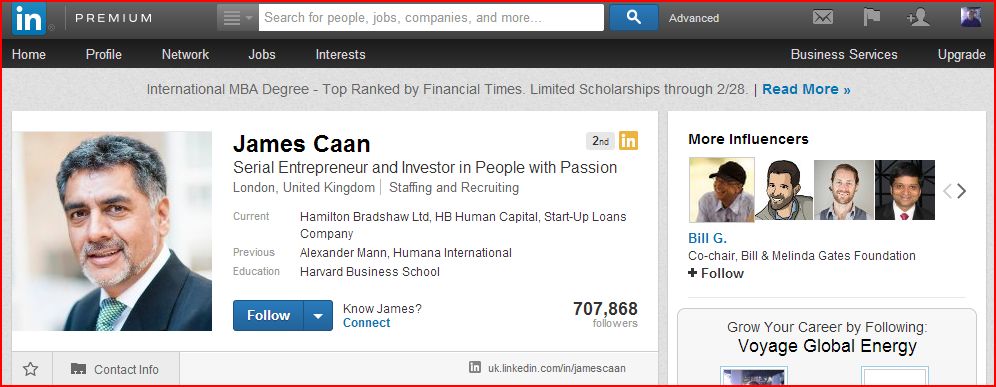
linkedin profile james caan
Linked In Profile

A good profile tells people who you are more and is a showcase for your talents, background, experience and interests. It also makes you appear to be a more competent user in the network and therefore someone a prospect would like to network with. Your profile is the foundation for growing your influence and building your business.
complete your Linked In profile.

Here are key steps in building an effective profile:

1. Upload a Professional Picture.

Professional Linkedin Picture
Professional v Unprofessional Linked In Pictures

Absolutely essential really. Without a picture people think you have something to hide or maybe just cant be bothered. You should use a recent (you want people to recognise you when you meet) clear, in focus ‘Head and Shoulder’s shot of you. Avoid holiday snaps and silly expressions or poses. This is your best opportunity to make a great first impression,and it is essential to attracting connections.

2.Create a Compelling Headline

You only have 120 characters at the top of your profile to describe what you do and attract attention. Typically I see people use a Job Title but I recommend you use that space more imaginatively. Your current position further down your profile will give people your title. Use brief, descriptive, compelling keywords so the right people on
Linked In can discover you. For example: Automotive Manufacturing Expert rather than Manufacturing Director,Automotive Components Ltd. I know it sounds a bit corny to some of you but it does work.

3.List Your Current Position and At Least Two Past Positions

Use the same descriptive keywords that you quoted in your headline if possible, and be sure to describe your role for each position. Don’t go all the way back to that paper round you did as a Teenager but some history is good as it helps you pick up useful contacts amongst former colleagues.

4.Complete the “Summary” Section of Your Profile

Describe who you are,what you do and how you help people. Its often suggested that you write your summary in the third person and I agree. If you don’t you will be using the letter “I” quite a bit which puts some people off.

linkedin summary
A Linked In Summary

5.Complete the “Specialities” Section of Your Profile

These are the terms that will help you show up in search results within Linked In so think carefully what you want to put. Just like SEO don’t just use keywords that you think describe what you do but use phrases that people in your target markets might search for re your background, experience, and products/services.

6.Give and get some recommendations as soon as possible.

You will need at least three recommendations in order for Linked In to label your profile as complete. The best way to get recommendations is to give them so connect with people you know and ask them.

7.Complete the “Interests” and “Groups and Associations”

Your potential connections like to see what kind of person you are and what your professional interests are so give them an idea. Join at least a few groups relevant to what you do. Each of the terms in this section will be hyper-linked and will take you to other users in the network who share these interests.

8.Edit your Public LinkedIn URL

Linked In allocates you a rather lengthy LinkedIn URL unsurprisingly because unless you have an unusual name there are going to be 100′s or even 1000′s of people with your name. Customise it using the edit mode in LinkedIn. For example uk.linkedin.com/in/barackobama looks so much better and shorter (well it does if your called Barack Obama but you know what I mean!) .Customisation will optimise your Linked In profile to show up in search results on major search engines when someone searches for your name.
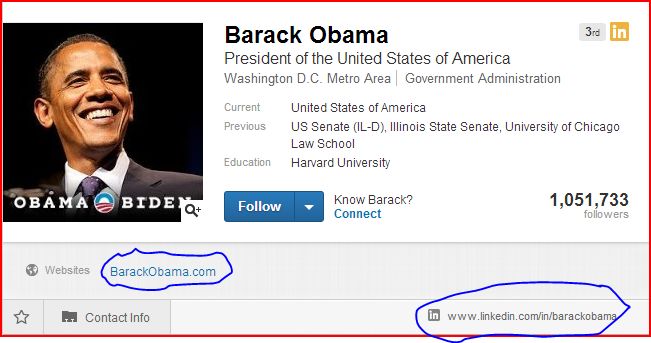
linked in customise website and linked in url  links
Linked In > Customised Website and Linked In url links

9.Customise Your “website” Listings

Under the “websites” section of your Linked In profile, you can list up to three URLs. Choose the “other” option when setting up these links and describe them with relevant terms. For example,rather than using the terms “website,” use your business name or name of a blog if you have one. Not only is this more descriptive, it also gives you a better opportunity to rank for those keywords in search engines.

10.Include a Link to Your Twitter Profile

Adding the link to your Twitter feed give people another opportunity to connect with you!

11.Make Your Entire LinkedIn Profile Publicly Visible to Everyone.

Linked In allows you to restrict who can see your profile in its privacy settings. If you have something to sell and want other professionals on Linked In to be able to find you being invisible won’t help you build your network. Once you have implemented these tips you will then be ready use Linked In to really grow your network and your business.

I hope this helps please get in touch here if you would like a free Linked In Training Needs Assessment.

Coming Soon : Part 2: Understanding the Difference between Linked In Company Pages ad Facebook Fan Pages

Subscribe to our updates here to be sure you dont miss it.

Windows XP support ends April 2014 what does it mean for you ?

Windows XP SP3 and Office 2003 will go out of support on April 8, 2014 (see the Microsoft announcement here) so what does this mean for you ?Well nothing if you don’t have any PC’s or Laptops still running either of them ! However many businesses still have many PCs that do.

download

So what does that mean ? Well from that date there will be no new security updates, non-security hotfixes, free or paid assisted support options or online technical content updates.

In practical terms this does not mean they will stop working its just that Microsoft wont issue updates for them anymore. This includes liaising with the security software providers like ESET to help them stop Viruses for XP. PCs running XP will become very vulnerable from a security point of view re malware and spyware that its easy to pick up from email and web pages. Even if you have probably the best security software on the market (such as ESET) which will protect you to some degree a ‘supported’ Operating system is the key element of good security.Recently Microsoft have partially relented and will continue with limited updates until 2015 which will help stave off the worst threats.

 Unfortunately this will still leave you more vulnerable re security attacks.As 30% of the World’s PCs still run XP this is a great opportunity for cyber criminals so I would guess we will see a big rise in Viruses and other Security threats specifically written to exploit the new vulnerabilities in XP. 

So it will  expose your company to potential risks, such as:

Security & Compliance Risks: Unsupported and unpatched environments are vulnerable to security risks. This may result in an officially recognized control failure by an internal or external audit body, leading to suspension of certifications, and/or public notification of the organization’s inability to maintain its systems and customer information.

Lack of Independent Software Vendor (ISV) & Hardware Manufacturers support: A recent industry report from Gartner Research suggests “many independent software vendors (ISVs) are unlikely to support new versions of applications on Windows XP in 2011; in 2012, it will become common.” And it may stifle access to hardware innovation: Gartner Research further notes that in 2012, most PC hardware manufacturers will stop supporting Windows XP on the majority of their new PC models.

So  what should you do ?

Unfortunately there is nothing much you can do except replace or upgrade your PCs. Realistically a new PC is going to be the best option .

Get in touch here if you need any help or advice.

Tim Eveleigh

Are Website’s Passing into History ?

There’s an interesting article today by Graham Jones suggesting that people searching for your business are now more interested in engaging with you via your other on line channels (e.g. Social Media) than your website. I tend to agree I think the Corporate Website (information only) though not the E-Commerce Website is in decline and is now a back up for your other digital marketing activities.Yet another reason if you need one to really focus your Social Media efforts and strategy.

You can read Graham’s article here.

Get in touch here for a free Digital Marketing consultation.

Domain Names are changing in 2014

A big shake up is coming to the internet in 2014 .Alongside traditional .co.uk ‘s and .com’s hundreds of new domain extensions are being introduced from early 2014 and these could profoundly affect the way you market your business and how its found on the search engines.These include :

yourdomain.bank
yourdomain.bet
yourdomain.build
yourdomain.buy
yourdomain.car
yourdomain.clothing
yourdomain.company

and hundreds more

When these are released, they will become available through a number of phases. These three phases below will help you decide when to apply for the domain(s) that you’re interested in.

Sunrise
This is the first phase that new domains will be released through. This is the phase during which you need to apply for your domain if you have a trademark that matches the domain that you want to secure. The dates that new domains go into Sunrise will vary, so ensure you create a watch list and register for updates. Then, we’ll let you know as soon as the date for the Sunrise period is set.
Landrush
This is the phase where higher value, shorter and more memorable domains go on sale. Not all new  domains will necessarily have a Landrush period, but we will notify you if/when any of the domains on your watch list are due to go into this period.
General Availability
Once the Sunrise and Landrush periods finish, the new domains will then go on general sale on a first come, first serve basis. Some domains may have specific restrictions on their use – the rules that govern their usage will be set by the individual registries.

What to do next ?

Register with us and we will create a watch list for you and send you email alerts when domains you are interested in reach the stages above or become available for registration.  Get in touch here for updates with us and grab a unique domain that links your brand to your industry or location.

Big boost to your Internet Security as DESlock+ encryption software now available !

As ESET resellers we are pleased to see DESlock+ encryption software now available from ESET UK.This is a big boost for business internet security.

DESlock+ is a simple to use, powerful encryption application for companies large and small. The software allows you to safely encrypt hard drives, removable media, files and e-mail using the most advanced algorithms and standards to create secure keys. The product features;

· File and folder encryption

· Removable media encryption

· Full disk encryption

· Outlook plugin for email and attachments

· Centralised management

Get in touch here for a free security consultation,a quotation or just to find out more .

What Mobile Internet Option should you go for ?Mobile Websites or Apps?

downloadWith around 50% of Internet Traffic coming from ‘Mobile’ – Smartphones and Smaller Tablets its important to get your mobile internet strategy just right. The key question is do you go for a Mobile Website or an App ? To find some answers we have just added a new Mobile Internet section to this site here

For more information contact us for more information or a free consultation. contact us

S Commerce is growing in importance

S Commerce is  a growing part of electronic commerce where the retailer uses social media like Twitter,Facebook and Pinterest to interact with prospective customers to assist in the online buying and selling of their products and services.

As we can see from the massive growth of S Commerce pioneers like ASOS businesses are starting to see how marketing on Social Media really can make them money. 

In my view this is just the beginning !!

What do you think ?

If you want help with Scommerce or just want to keep up to date with the latest Inbound Marketing News ,Views,Hints and Tips  SUBSCRIBE to our EMAIL UPDATES –You can also find more information on how we can help you on our Website or Contact Us if you want to know how we can help you.

Richard